Lesson 1: Introduction to Microbit
Lesson 1: Introduction to BBC Microbit
The BBC micro:bit is a small programmable computer designed to help us to learn coding, electronics, and physical computing. It was introduced by the BBC in the United Kingdom to encourage us to develop interest in technology and programming.
The micro:bit can sense the environment, display information, and interact with other devices. It has many built-in components such as LEDs, buttons, sensors, Bluetooth, and radio communication.
We can program the micro:bit using simple block-based coding using the Microsoft MakeCode editor.
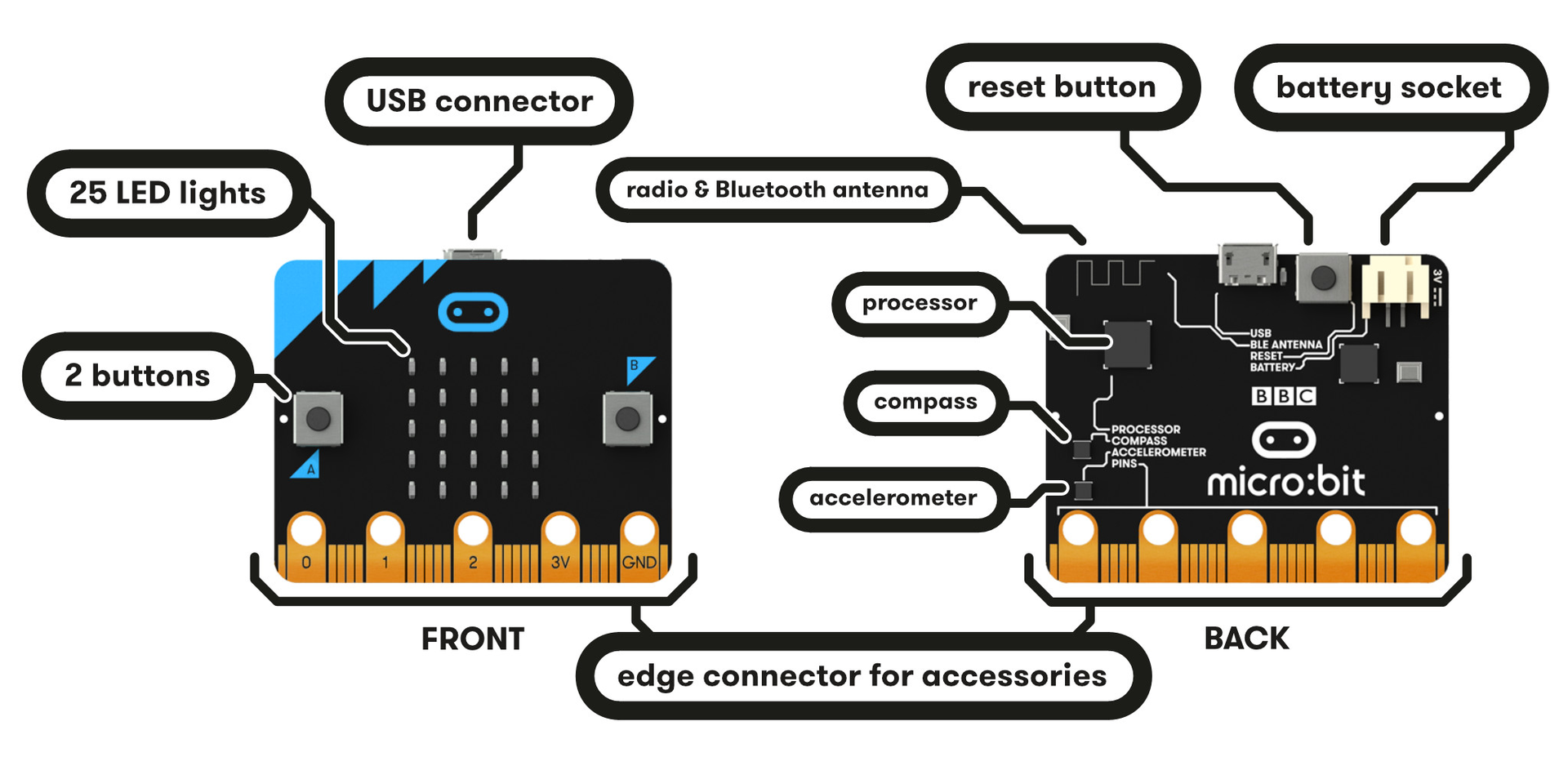
The micro:bit is widely used in schools for learning:
- Coding
- Robotics
- Electronics
- Internet of Things (IoT)
Learning Objectives
After completing this activity, we will be able to:
• Understand what a microcontroller board is
• Identify the main parts of the micro:bit
• Learn about built-in sensors in the micro:bit
• Understand how the micro:bit interacts with the real world
• Explore how micro:bit can be programmed
Materials Required
• BBC micro:bit board
• USB cable
• Computer or laptop
• Internet connection
• Microsoft MakeCode Editor
What is a Microcontroller?
A microcontroller is a small computer on a single chip that can control electronic devices.
It consists of:
- Processor (brain)
- Memory
- Input and Output pins
- Sensors
The micro:bit is a microcontroller board that allows users to easily create interactive projects.
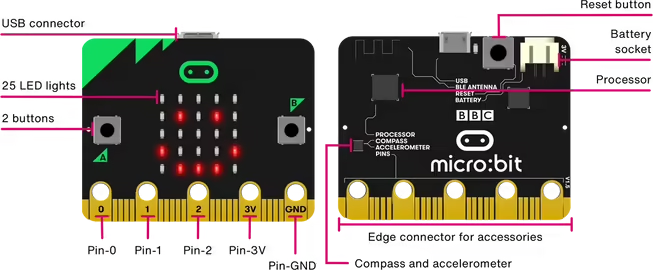
1. LED Display (5×5 Grid)
The micro:bit has 25 red LEDs arranged in a 5×5 grid.
Functions:
- Display numbers
- Show text
- Create icons and animations
Example:
You can display:
- Numbers
- Letters
- Emojis
- Simple graphics
2. Button A and Button B
The micro:bit has two programmable buttons.
Functions:
- Used as input devices
- Trigger different actions in a program
Examples:
- Button A → Increase score
- Button B → Decrease score
- Button A+B → Reset game
3. Edge Connector Pins
At the bottom of the micro:bit there are pins for connecting external components.
Important pins:
Pin | Function |
P0 | Input/Output pin |
P1 | Input/Output pin |
P2 | Input/Output pin |
3V | Power output |
GND | Ground |
These pins allow connection with:
- LEDs
- Sensors
- Motors
- Buzzers
4. USB Port
The USB port is used to:
- Connect the micro:bit to a computer
- Upload programs
- Provide power
5. Reset Button
The reset button is located on the back side.
Function:
- Restart the micro:bit program
The back side contains important hardware components.
1. Microcontroller (Processor)
The microcontroller is the brain of the micro:bit.
Functions:
- Executes the program
- Processes sensor data
- Controls outputs
2. Bluetooth Antenna
The micro:bit supports Bluetooth communication.
Uses:
- Connect to smartphones
- Communicate with other micro:bits
- IoT projects
3. Battery Connector
This connector allows the micro:bit to be powered using two AAA batteries.
Built-in Sensors in micro:bit
Sensors allow the micro:bit to detect and measure environmental conditions.
1. Temperature Sensor
The micro:bit has a built-in temperature sensor.
Function:
Measures the temperature of the surrounding environment.
Uses:
- Weather stations
- Smart home monitoring
- Environmental studies
Example:
Display the room temperature on the LED screen.
2. Light Sensor
The micro:bit can measure light intensity using its LED display.
Function:
Detects how bright or dark the environment is.
Applications:
- Automatic night lights
- Smart brightness control
3. Accelerometer (Motion Sensor)
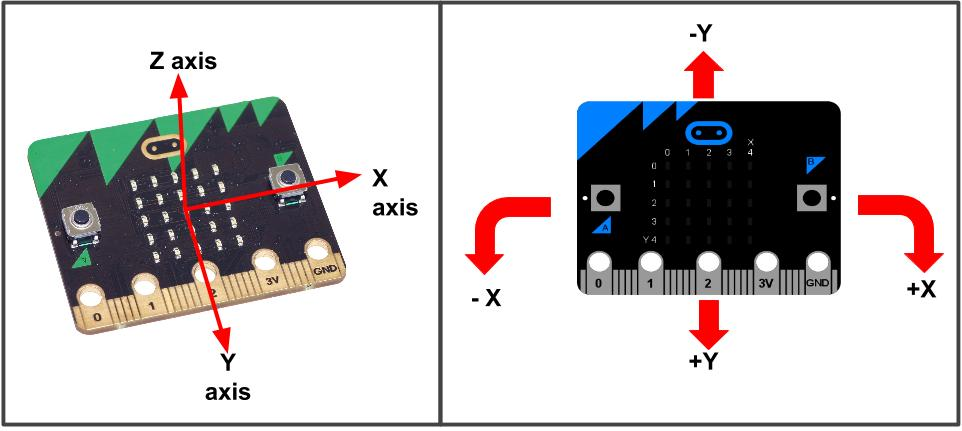
The accelerometer detects movement and orientation.
It can detect:
- Shake
- Tilt left
- Tilt right
- Face up
- Face down
- Free fall
Applications:
- Step counters
- Motion-controlled games
- Fitness trackers
4. Compass Sensor (Magnetometer)
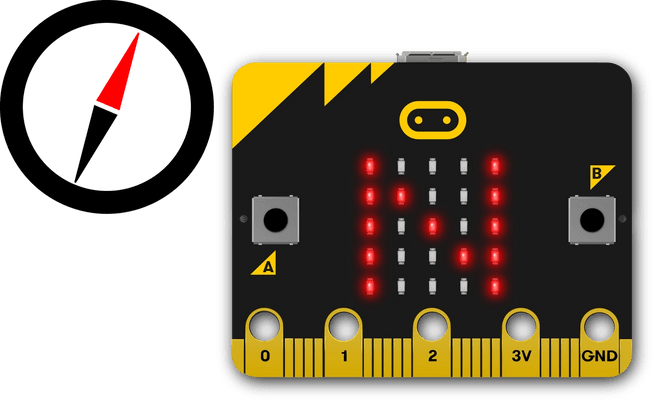
The compass sensor detects the Earth's magnetic field.
Function:
Shows the direction (North, South, East, West).
Applications:
- Navigation devices
- Digital compass
- Direction-based games
5. Microphone (micro:bit V2)
The newer micro:bit V2 includes a microphone sensor.
Function:
Detects sound levels.
Applications:
- Clap detection
- Noise monitoring
- Sound-based games
6. Speaker (micro:bit V2)
The built-in speaker allows the micro:bit to produce sound.
Applications:
- Music player
- Alarm systems
- Sound effects in games
Programming micro:bit
The micro:bit can be programmed using different platforms:
Platform | Type |
Microsoft MakeCode | Block + JavaScript |
Python | Text-based coding |
Scratch | Visual programming |
For beginners, Microsoft MakeCode is the most popular.
Website:
Real-Life Applications of micro:bit
The micro:bit is used in many real-world projects:
• Smart home automation
• Weather monitoring systems
• Fitness trackers
• Security alarms
• Robotics projects
• IoT devices
There are no comments for now.